
 Microsoft released Internet Explorer 7 in October of 2007, version 8 in the summer of 2009, and version 9 (Vista and 7 users only) in March 2011. Although each new version contains many improved features, it has also brought on a slew of new problems for computer users just moving to it.
If you are bent on using Internet Explorer (instead of Mozilla Firefox or Google Chrome as I recommend), but continue to have nagging problems, Microsoft did build in a feature that lets computer users have a do over. The following tool will reset Internet Explorer to all the Microsoft defaults.
By resetting all settings and disabling add-ons it does miraculously cure some of its ailments…although not all. If you are in need of some Internet Explorer relief, give these steps a try…or do as we did almost 10 years ago; switch to Mozilla Firefox or Google Chrome.
* Please note that if you can’t get Internet Explorer to open at all, go to the Control Panel and click Internet Options, then start these steps with step 2.
- Click Tools –> Options from the tool bar or menu bar
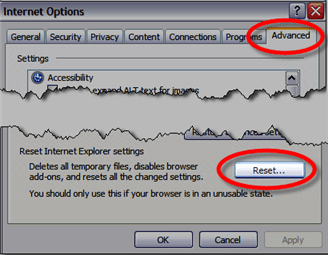
- Click the Advanced tab
- Click the Reset button towards the bottom under the “Reset Internet Explorer settings” section
- Click OK
- Click Close after the reset
- Click OK
- Close Internet Explorer
- Wait 15 seconds
- Restart Internet Explorer
Any saved passwords will be gone (because cookies are deleted) and your home page will be reset to the Internet Explorer default of MSN. Other than that, your browser problems should go away and your browsing may speed up as well.

HmmI didnt realize theyd started lagging the SP that early. OK, I stand corrected; this years 41% drop is probably not meaninful.
Thanks for this post, i will try that.
Comments are closed.